Coding
The Coding block (found under Quantum in the Tools panel) shows the code for a Circuit block on the same canvas, the Qanvas equivalent of the code panel in Qompile. For what the code itself means, see Qompile's Build with code pages, the same OpenQASM, Qiskit, Cirq, and Q# output applies here.
Choosing which circuit to show
Since a workspace can hold more than one Circuit block, the Coding block's header has a dropdown to pick which one it's currently displaying by name:
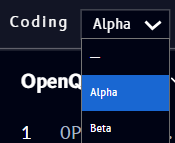
- - (a dash) - show no circuit
- Any named circuit on the canvas (Alpha, Beta, ...) - show that circuit's code
This same dropdown pattern, pick a circuit by name, appears again on the Bloch sphere, Q-Sphere, and Results blocks.