Quiz
Quiz (found under Basic in the Tools panel) places an embeddable multiple-choice question block on the canvas, useful for turning a workspace into a short self-check alongside your circuits and notes.
Editing a quiz
A new quiz opens in Edit mode, where you write the question:
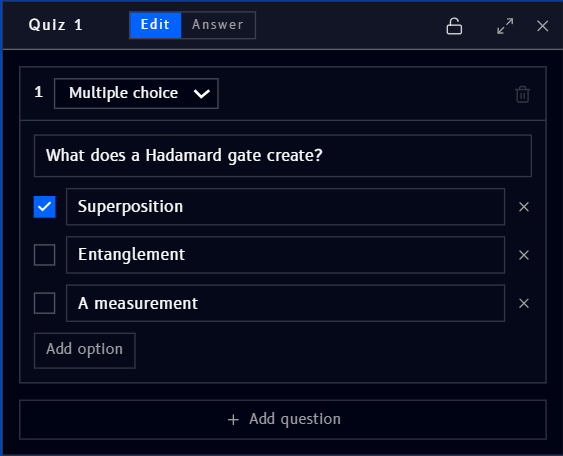
- Multiple choice - the question type (currently the only type shown)
- Type the question text into its own field
- Add and edit options, one per row, with an X to remove an option
- Check the box next to an option to mark it as the correct answer
- Add option adds another row
- Add question adds another question to the same quiz block
- The trash icon (top right of the question) deletes that question
- The lock, expand, and X icons (top right of the block) lock, expand, and close the quiz block
Answering a quiz
Switching to Answer mode shows the quiz the way someone taking it would see it, options only, no correct-answer checkmark:
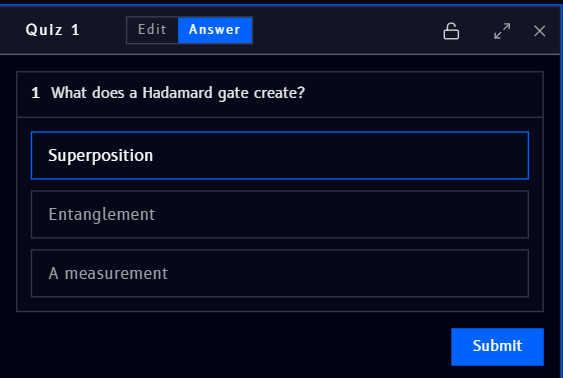
- Click an option to select it
- Submit checks the answer
Example
The question shown above, "What does a Hadamard gate create?" with Superposition marked correct, is a natural companion to the Hadamard (H) gate reference page, a quick way to check understanding right next to a circuit that demonstrates it.