Grades
Grades, found in the sidebar below the modules list, shows every graded item across the track in one table:
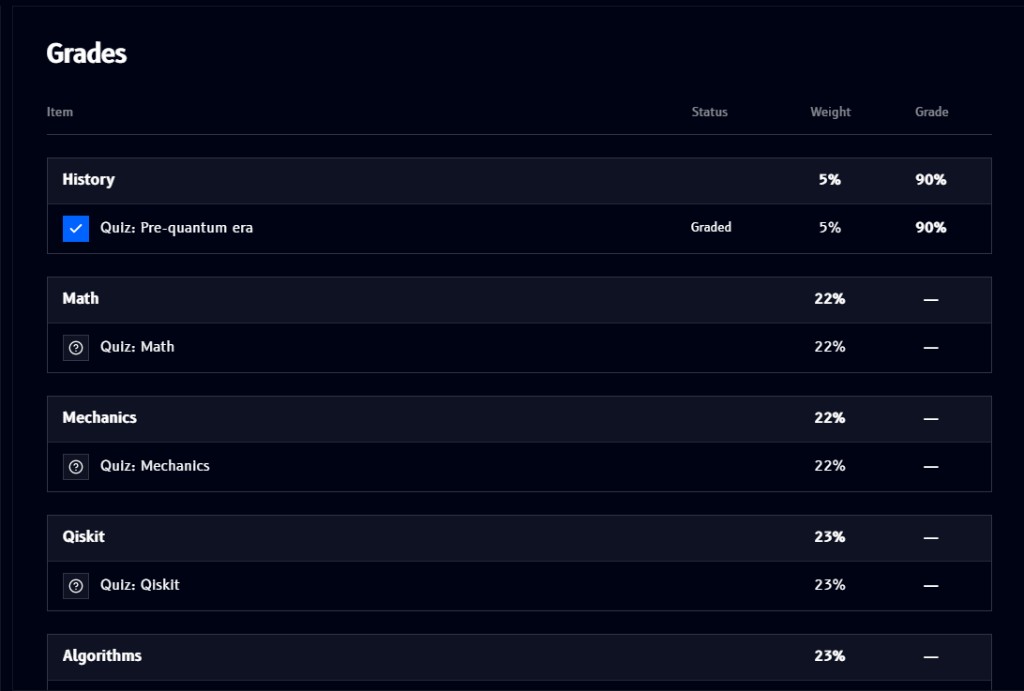
- Each module is a row (History, Math, Mechanics, Qiskit, Algorithms, ...), with its own Weight, how much it counts toward your final grade, and an overall Grade for that module
- Underneath each module, its individual graded items (currently quizzes, e.g.
Quiz: Pre-quantum era) list their own Status (Graded, or a?icon if not yet attempted), Weight, and Grade - A module's grade shows as a dash (
-) until you've completed its graded item(s)
In the example above, History's Quiz: Pre-quantum era is graded at 90%, while Math, Mechanics, Qiskit, and Algorithms are still ungraded.