Build your circuit with code
Alongside the drag-and-drop canvas, Qompile shows a live code panel that reflects your circuit in real time - build visually and read the code, or edit the code directly and watch the circuit update.
Two-way sync
The code panel and the Circuit canvas are fully synced in both directions, for all four supported languages:
- Dragging and dropping gates on the circuit canvas updates the code instantly
- Editing the code directly (in OpenQASM, Qiskit, Cirq, or Q#) updates the circuit diagram instantly
This means you can freely switch between building visually and writing code, even mid-circuit, without losing anything.
Language switcher
Click the language name at the top of the code panel to switch between supported languages:
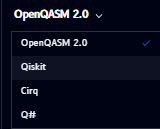
Supported languages:
- OpenQASM 2.0 - a low-level, hardware-agnostic quantum assembly language, an open standard rather than tied to one vendor
- Qiskit - IBM's Python SDK for quantum computing
- Cirq - Google Quantum AI's Python framework for quantum circuits
- Q# - Microsoft's dedicated quantum programming language, part of the Quantum Development Kit
OpenQASM
OpenQASM (Open Quantum Assembly Language) is a low-level, hardware-agnostic language for describing quantum circuits: registers, gates, measurements, and (in later versions) classical control flow, written as plain text instead of a general-purpose programming language. It was originally introduced by IBM in 2017 and is now developed as an open standard, with its own specification and steering committee, so it's supported well beyond just Qompile or IBM's tools, most quantum SDKs (including Qiskit and Cirq) can import and export it.
By default, the panel shows OpenQASM 2.0. A circuit with an H gate and a CNOT looks like this:
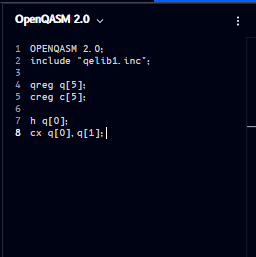
OPENQASM 2.0;
include "qelib1.inc";

qreg q[5];
creg c[5];

h q[0];
cx q[0], q[1];
qreg/cregdeclare the quantum and classical registers, matching what's set up in Manage registers- Each subsequent line is one operation, in the order it appears on the circuit (
h= Hadamard,cx= CNOT) - The ⋮ menu (top-right of the panel) provides additional options for the code view
OpenQASM 2.0 vs 3.0
Qompile's code panel outputs OpenQASM 2.0, the version that's been the de facto standard for years and what most tools (including Qiskit and Cirq) expect by default. OpenQASM 3.0 is a newer revision of the spec that adds things like classical control flow, subroutines, and more expressive timing, useful for advanced or research use cases, but not something you need to know to read what Qompile shows you.
For the full language specification, see the official OpenQASM documentation.